 Gourav
 Introduction
Let’s be real: updating your LinkedIn profile shouldn’t require shelling out $500 for a stuffy, high-pressure studio photoshoot. Yet, for years, that was the standard if you wanted to look credible online. Here at AI Tool Notes, I spend my days deep in the trenches testing the latest software. But when it came time to refresh my own professional presence, I wanted to see if the hype was real. Could AI actually replace a real photographer without making me look like a plastic, over-smoothed robot staring into the void?
I decided to put my own face on the line to find out. In this guide, I’m cutting through the endless tech jargon to review the top AI headshot generators of 2026—focusing on current heavy-hitters like Aragon AI and BetterPic that have finally mastered the natural lighting and “micro-imperfections” needed for true realism. My goal is to make it simple and practical for everyday professionals to get a great headshot in minutes, not weeks.
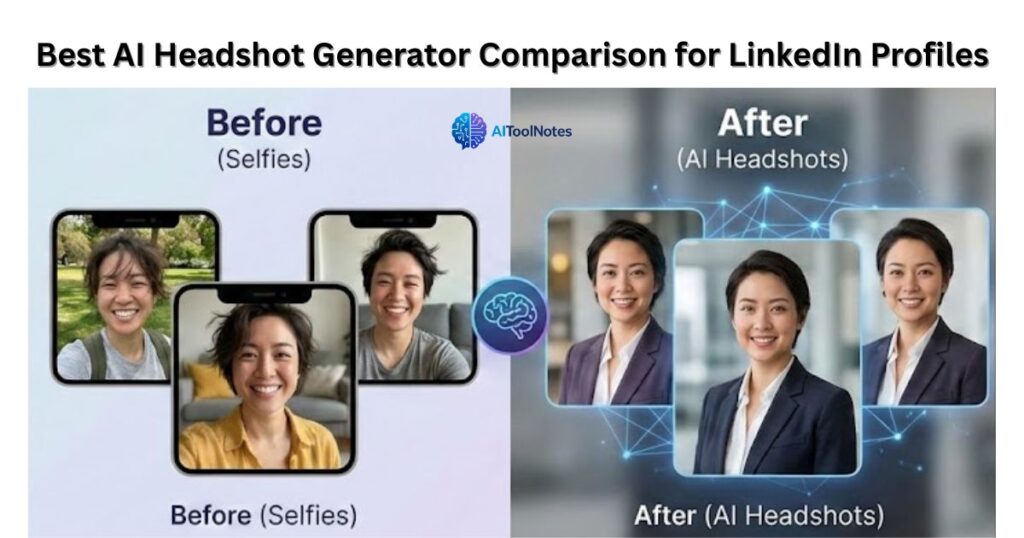
Why getting a good LinkedIn headshot is usually a hassle?
If you are anything like me, the traditional photography process is a headache you’d rather avoid. First, you have to hunt down a local studio, try to align your busy schedule, and swallow that hefty session fee. Then comes the actual shoot—standing under hot lights, feeling incredibly awkward in front of a camera while a stranger tells you to “act natural.” Finally, you are left waiting weeks just to get a handful of edited digital files.
The reality is that most of us don’t want a glamorous, magazine-cover photoshoot. We aren’t trying to be supermodels; we just want a clean, confident picture that accurately represents us. We simply need a solid photo to help us land a new job, pitch a client, or network effectively without feeling self-conscious.
The best AI headshot generators I actually tested
I didn’t just read the glossy marketing brochures for this review. To see which platforms actually deliver genuine, LinkedIn-ready results, I skipped the hype and uploaded my own casual, everyday selfies. I wanted to see exactly how these tools handled real-world inputs—bad lighting, messy hair, and all. Here are the generators that actually survived the test and are worth your time in 2026.
1. HeadshotPro
If you want that crisp, Fortune 500 executive look, HeadshotPro is your best bet. My experience with its corporate focus was incredibly smooth. It delivers highly realistic business headshots with minimal AI artifacts—none of those weird melted collars or distorted backgrounds. Depending on the package you choose, it boasts a fast turnaround time of just one to three hours, making it a powerhouse for both individual professionals and entire remote teams.
2. Dreamwave
When it comes to handling your actual facial features without making you look like a video game character, Dreamwave is on another level. Dreamwave excels at authentic, natural aesthetics, completely avoiding the common “AI blur” or over-smoothed skin that ruins so many AI photos. It captures micro-imperfections perfectly, leaving you with a headshot that looks like you simply had a great hair day in front of a professional photographer’s lens.
3. Aragon AI
For those who like to tinker and have options, Aragon AI is the undisputed king of creative control. It generates highly realistic, photographer-like results in about 45 to 60 minutes. What really impressed me was the sheer volume of choices—giving you a huge variety of backgrounds, outfits, and poses. With their recent built-in “Remix” features, you have the flexibility to dial in the exact professional vibe you want.
Quick comparison: Which tool wins?
| AI Tool Name | Best For | Realism | Turnaround Time |
| HeadshotPro | Corporate & Teams | 8.5/10 | 1-2 Hours |
| Dreamwave | Natural Looks | 9/10 | Varies |
| Aragon AI | High Customization | 9/10 | ~60 Minutes |
Step-by-step: How to generate your perfect profile picture?
If the thought of posing in a studio makes you break out in a cold sweat, you’re in the right place. After generating literally hundreds of AI photos to see what actually works, I’ve nailed down a foolproof system. Here is the exact, hassle-free process I use to get a flawless LinkedIn headshot without leaving the house.
Step 1: Gather your selfies
The AI is only as good as the raw material you feed it. Dig through your camera roll and find 10 to 15 well-lit photos of yourself. You want a mix of different angles, backgrounds, and natural expressions. Avoid group shots where you have to crop someone’s shoulder out, and definitely skip the heavy social media filters.
Step 2: Choose your platform
Your choice here really depends on your budget and how many options you want. If you are looking for the best entry-level value in 2026, I recommend HeadshotPro, which currently starts at just $29 for a solid batch of 40 photos. If you have a little more wiggle room and want maximum customization, Aragon AI is a fantastic premium pick starting at $35.
Step 3: Select your industry style
Before the generation begins, the tool will ask you what kind of “vibe” you want. Keep it relevant to your actual day-to-day work and your LinkedIn audience. For the vast majority of professionals, “business casual” is the absolute sweet spot. It looks polished and capable without feeling overly stuffy.
Step 4: Let the AI work
Once you hit upload, it’s time to step away and grab a coffee. The system isn’t just slapping a preset filter on your face; it is actively training a custom neural network on your specific facial geometry. While speeds have improved drastically this year, you should still expect the AI to take anywhere from 30 minutes to about 2 hours to fully process and render your images, depending on the tier you purchased.
Step 5: Download the best options
When the final gallery is ready, you’ll have dozens of headshots waiting for you. Don’t be alarmed if a handful look a little weird—that is just the nature of generative AI. Sift through the batch, pick the top two or three that truly look like you on a great day, download them in high resolution, and give your LinkedIn profile that long-overdue refresh.
My pro tips for avoiding the “fake AI” look
Look, AI has come a long way in 2026, but it’s still prone to the occasional “glitch in the matrix.” During my own tests, I had a few good laughs at the results—one generator tried to merge my blazer directly into a marble wall, and another gave me a very subtle, nightmare-fuel sixth finger resting casually on my lapel. It’s these tiny, “uncanny valley” details that can make a profile picture go from professional to “obviously a robot” in seconds.
To make sure you actually look like a human being and not a high-res CGI character, here are my tried-and-true tips:
- Ditch the accessories: When uploading your source photos, avoid anything with sunglasses, hats, or heavy social media filters. The AI needs to see your actual face and bone structure to map it correctly.
- Keep it grounded: Stick to neutral or office backgrounds. While a dramatic “sunset on a mountain” might look cool, it often triggers lighting inconsistencies that scream “AI-generated.” Standard professional backdrops are much more forgiving.
- The “Mom Test”: Before you hit ‘upload’ on LinkedIn, send the photo to a friend or family member. Ask them one simple question: “Does this actually look like me in real life?” If they hesitate, it’s probably a bit too “plastic”—try a different shot from your generated batch.
Final thoughts: Are AI headshots worth it?
At the end of the day, an AI headshot isn’t going to replace the nuanced artistry, lighting expertise, and personal touch of a high-end human photographer. However, let’s be practical: if you’re a busy professional who needs a sharp, credible LinkedIn update today without spending $500 and half a Saturday in a studio, these tools are an absolute lifesaver. For the price of a few lattes, you can get a gallery of photos that look 95% as good as the real deal.
What do you think? Which AI tool are you planning to try for your profile? Let me know your results (and any funny AI fails!) in the comments below!







