Gourav
 Introduction
The landscape of AI music generation is evolving rapidly, with new tools promising to turn simple text prompts into radio-ready tracks every other week. But as any creator knows, the real test isn’t the promise—it’s the workflow. Does the tool get in your way, or does it spark creativity?
Today, I’m diving into Sonauto, a platform that claims to help you “Start Your Masterpiece” with unprecedented control.

First Impressions: The Dashboard
After creating my account, I was immediately taken to the main dashboard—and I have to say, the first impressions are strong. Sonauto opts for a sleek, dark-mode interface that puts creation front and center.
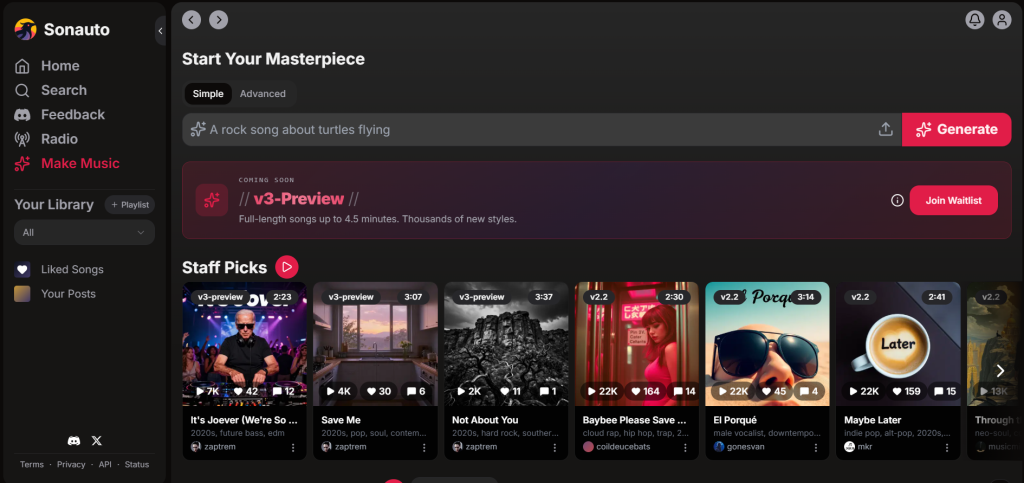
Unlike some cluttered interfaces I’ve used, this dashboard is refreshingly clean. At the very top, you have a simple toggle between “Simple” and “Advanced” modes, catering to both beginners and those who want granular control. The central focus is a large prompt bar inviting you to type anything—even something as random as “A rock song about turtles flying”—to get started. Below that, the “Staff Picks” section gives a glimpse into what’s possible, showcasing v3-preview tracks that hint at high-quality output.
What’s Next?
But a pretty interface is only half the battle. In this review, I’m going to go beyond the dashboard. I’ll walk you through the “Make Music” features, test the generation speed, and see if Sonauto can actually deliver on that masterpiece promise.
Simple vs. Advanced Mode: Choose Your Workflow
One of the best features I discovered on the Sonauto dashboard is that it doesn’t force a complicated workflow on you immediately. Right at the top of the “Make Music” interface, there’s a toggle that lets you switch between Simple and Advanced modes depending on how much control you want.
Here’s a breakdown of how they differ.
Simple Mode: For Quick Ideas
When you first sign up, Sonauto defaults to Simple mode. As you can see in the first screenshot, this interface is incredibly clean. It removes all the distractions and gives you a single text prompt bar.
How it works: You just type a natural sentence describing what you want—for example, the placeholder text suggests “A rock song about turtles flying.”
Best for: This is perfect for beginners or when you just want to test the AI’s creativity without getting bogged down in settings.
Advanced Mode: For Total Control
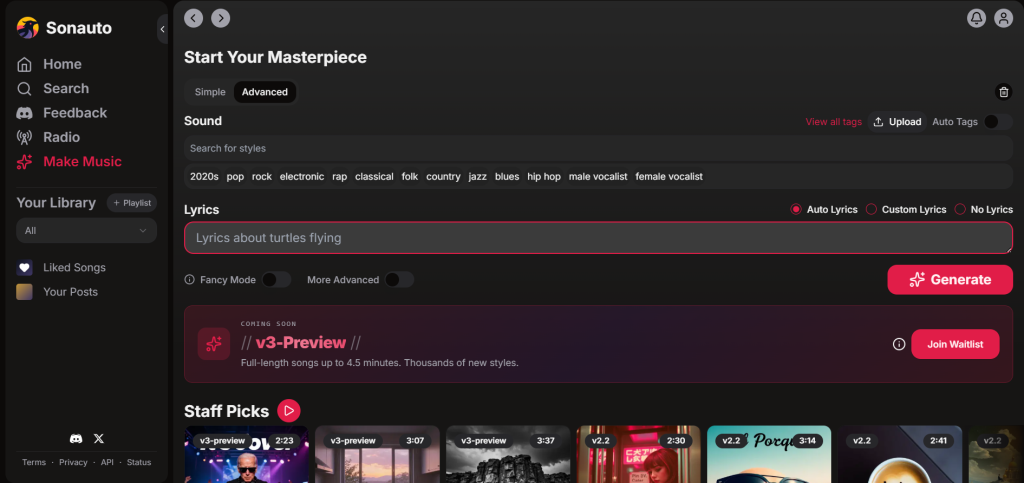
If you toggle the switch to Advanced, the interface expands to reveal a powerful set of tools, as shown in the second screenshot. This is where the real customization happens.
Sound Selection: Instead of guessing the genre, you get a dedicated “Sound” search bar. You can see tags like “2020s,” “pop,” “rock,” “electronic,” and “male/female vocalist” to guide the AI.
Lyric Control: This is the most important feature for songwriters. You aren’t stuck with random AI lyrics. You can choose from auto lyrics (where the AI writes for you), custom lyrics (where you paste your own words), or no lyrics (to generate a pure instrumental track).
Fine-Tuning: There are also options for “Fancy Mode” and “More Advanced” settings if you need to tweak the generation further.
Putting Sonauto to the Test: Creating My First Track
To truly understand what Sonauto is capable of, I decided to skip the basics and dive straight into Advanced Mode. My goal was to see if the AI could handle specific genre mixing and produce a coherent, radio-style track without me writing a single line of lyrics.
Here’s the exact configuration I used for the test.
The Prompt Setup
I set the controls to Auto Lyrics and input the following details:
Style Tags: 2020s, pop, electronic
Lyric Prompt: “A high-energy motivational song about never giving up on your dreams and conquering the world.”
With the settings locked in, I hit Generate. The processing speed was impressive—within moments, the track was ready.
The Verdict
Take a listen to the track above. You can immediately hear how the “2020s” and “electronic” tags influenced the production. The beat feels crisp and modern, very similar to what you might hear on the radio today. The vocals came through distinctly, and most importantly, the AI nailed the theme. It didn’t just generate random words—it actually captured the high-energy motivational vibe I asked for.
Conclusion: Is Sonauto Worth Your Time?
After exploring the dashboard and generating my first track, I can confidently say that Sonauto is one of the most user-friendly AI music tools I’ve tested recently.
What sets it apart is the balance it strikes between simplicity and control. The Simple Mode is perfect for instant gratification, but the Advanced Mode is where the real magic happens, giving creators enough levers to pull to feel like they’re actually directing the music, not just rolling dice.
Whether you’re a content creator looking for copyright-free background music, a songwriter seeking inspiration, or just someone who wants to hear a “rock song about turtles,” Sonauto is worth a spin. The interface is clean, the generation is fast, and the quality of the v3-preview model is genuinely impressive.
Ready to start your masterpiece? Head over to Sonauto, create a free account, and see what you can create in minutes.